
Slack is making it easier to sync up with all the third-party applications that are tied in with the productivity messaging service. The company announced the release of a “Sign in with Slack” button that performs the same features as with Facebook Login or Twitter OAuth, but with Slack. The first partner is Quip, which also revealed its integration. The goal is to have “happier, more productive teams.”
With this new platform button, Slack seems to be putting a stake in the ground by being the de facto way to manage business inside a company and wants its service to be the hub for all communication. It uses OAuth 2.0 and also includes new settings that developers can modify to control what information is needed to sign into third-party apps. Beyond Quip, only five other services have successfully integrated the “Sign in with Slack” button: Figma, Kifi, OfficeVibe, Slackline, and Smooz.
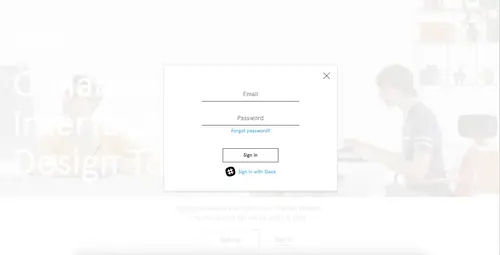
This isn’t the first time that Slack has deployed a button as it has an “Add to Slack” feature that will import content directly into channels. However, this is the latest step in the platform to allow developers and teams to authenticate into apps using their Slack credentials.
Launching the “Sign in to Slack” button and increased scopes falls in line with Slack’s developer roadmap, which it has published for everyone to see on a Trello board, all aimed to strengthen its developer community.
“The Slack integration is special,” Quip CEO Bret Taylor declared. “We’re targeting a similar demographic: The team. There aren’t that many products with that focus. Google Apps is on the email domain while Evernote is focused on the individual. Slack and Quip are spiritually aligned.”

Above: Create Quip Doc in Slack
Image Credit: Quip
Just as with any Slack tie-in, administrators will need to enable Quip before individual employees can leverage this relationship. A document can be shared or referenced simply by using the /quip command line, or you can paste the link to the document right into Slack.
Since Quip’s workflow facilitates collaboration, any discussions that take place around the contents of the document — such as edits or questions — will appear in Slack channels. However, it’s entirely up to you to determine how tightly integrated you’d like the channels to be. And although Quip has some features that are redundant with Slack, such as its chat rooms feature, Taylor explained that when integrated with Slack, those capabilities are “supressed.”
While Quip’s chat room feature did initially draw comparisons to Slack, with this direct integration, Quip is making documents and spreadsheets created in its app more accessible, no matter how people are working.

Above: Using the /quip slash command in Slack
Image Credit: Quip
“Slack is the most popular team chat software and we want documents to work really well with it,” he said. And although Taylor thinks of Quip and Slack as complementary, rather than competitive, he acknowledged that in the long-term, the two products may eventually compete in some areas.
The inclusion of a word processing service could be a welcome one for Slack, however, especially as it improves project collaboration. But the partnership between these two cloud-based services is also interesting because it’s a relationship between companies that have focused on the team, something Taylor called the “atomic unit of productivity.”
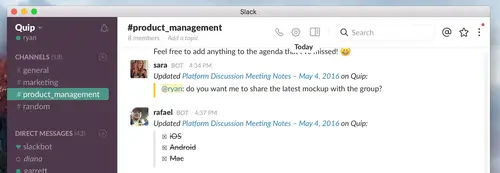
Above: Quip Doc change updates in Slack
Image Credit: Quip
This integration also represents how the modern workplace is changing, moving away from email as the foundation of working together. “Unlike restrictive legacy platforms, we’re purposefully open, conversation, and malleable,” the company wrote in a blog post. “Our platforms free up teams to do their best work without any of the pain.”
Taylor shared that although Slack is the first integration, it won’t be the last. “We are thinking broadly about partnerships and integrations around expanding the utility and market for the product,” he said.
. .