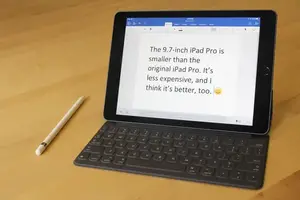
The new $599 9.7-inch iPad Pro feels a lot more comfortable to use than the original 12.9-inch iPad Pro that came out last fall. It’s also lighter, and less expensive.
The first one was impressive, but it didn’t run full OS X at a price and size that it could have and arguably should have. The new version, by contrast, feels like the best possible iPad, not a device so big that it can’t really be called just an iPad anymore.
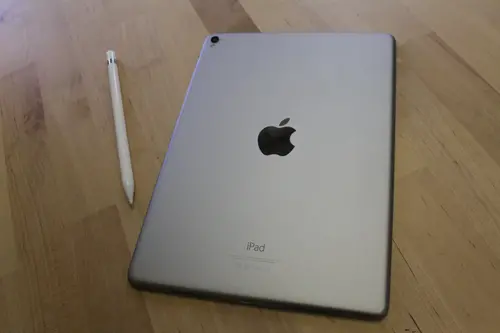
Above: Back of the 9.7-inch iPad Pro, and the Apple Pencil.
Image Credit: Jordan Novet/VentureBeat
It has the same helpful productivity features as the original: Split View lets you do two things at once, just like on a desktop computer. The $99 Apple Pencil feels about as natural as a stylus can. The $149 Smart Keyboard, with its support for shortcuts, lets you enter data into the tablet about as quickly as you can type.
But now that I’ve been using the smaller version, I can say confidently that it’s so practical that it makes the original look like a proof of concept.
Keyboards
The virtual keyboard on this tablet is not as full-featured as the one on the larger iPad Pro. There just aren’t as many keys.
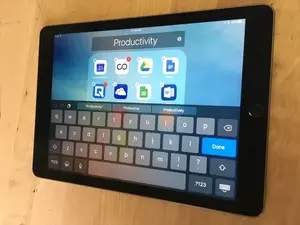
Above: The virtual keyboard on the 9.7-inch iPad Pro.
Image Credit: Jordan Novet/VentureBeat
It’s easier to type using my thumbs when I’m holding the device vertically, or peck with one finger. When I hold it horizontally, I find myself covering up the speakers and muffling the sound some. I can avoid that if I stretch out my hands and tap the keys with my fingers, although it doesn’t feel very good. The screen is a little small for me to comfortably type using all my fingers on the virtual keyboard, in both portrait and landscape modes.
So it’s a good thing you can buy a physical keyboard to go with this tablet.
The keyboard part of the Smart Keyboard is a fine feature of what really is a cover for the display. Because the display is smaller than the one on the original iPad Pro, the Smart Keyboard has also been shrunk down.
Just like with Google’s Pixel C tablet, I quickly got used to typing on the small keys of the Smart Keyboard. I was able to type at almost my regular speed without making many mistakes. The keys have minimal travel, and they make a subdued clicking sound when pushed.
The delete and return keys are small, so it’s easy to accidentally put your finger on the wrong key. There’s no escape key. There’s no backlight. There isn’t even a light on the caps lock.
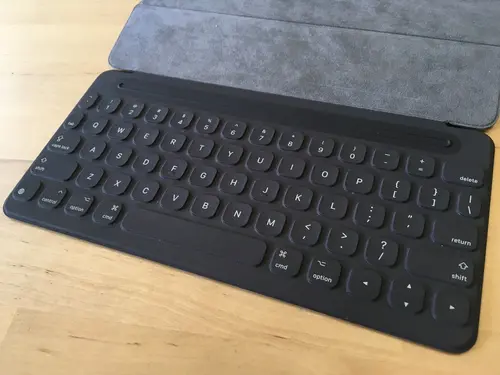
Above: The Smart Keyboard that goes with the 9.7-inch iPad Pro.
Image Credit: Jordan Novet/VentureBeat
When you’re using the tablet with the keyboard in your lap, it all feels flimsy, not sturdy. The display wobbles, and it’s hard to type accurately. It’s not really a laptop experience. You can use it at only one angle. In that regard, devices like the Surface, with its Hinge, or the HP Spectre, with its geared hinge, allow for more flexible usage.
On the back of the Smart Keyboard, you’ll find a rubbery casing that folds up and allows you to prop up the display when you want to type with the keyboard. It’s not the fanciest material.
Even with its drawbacks, the Smart Keyboard really is a good thing to have, especially when you’re on the go with the Pro.
Apple Pencil
Whether you’re drawing or even just tapping on stuff while navigating the Web or the home screen, the Apple Pencil works very well. It’s precise — unlike some alternatives, you don’t usually end up tapping something you don’t want to tap. Because it’s so accurate, you can do more when you’re zoomed out and you don’t feel like zooming in to make sure that you select the right thing. It’s liberating.
Unlike the Smart Keyboard, Apple did not come out with a miniature version of the Apple Pencil to go along with the smaller iPad Pro. So what you have here is a device that reaches farther across the screen. If you’re lazy about reaching your hand all the way out to touch some icon, then the Pencil is clutch.
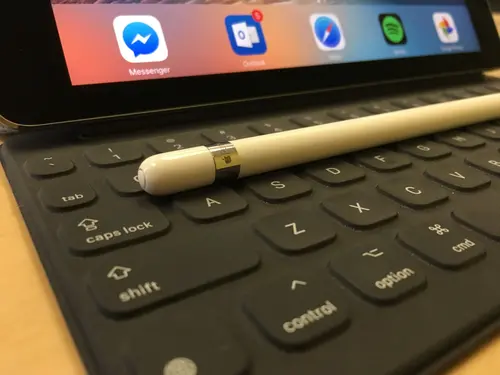
Above: The Apple Pencil and the 9.7-inch iPad Pro.
Image Credit: Jordan Novet/VentureBeat
In many apps, including Fifty Three’s Paper, the tablet is smart enough to know when you’re using the Pencil and when you’re merely swiping with your finger. But while you can swipe up from the edges of the display to do certain things, like going back and forward in Safari, the Pencil cannot perform these gestures.
It’d be nice to see that change. If you’re paying the extra money for the Pencil, it should be able to do everything that your finger can do, and more.
As was the case with the original iPad Pro, the new one still forces users to charge the Apple Pencil by sliding its Lightning jack into the port at the bottom of the iPad, creating a disproportionate lollipop shape — my editor thinks of as a carrot sticking out of your ear — that makes the Pencil precariously stick out. It feels … un-Apple. On top of that, the iPad doesn’t lie flat when the Pencil is plugged in. It rocks when you push down on one of the bottom corners.
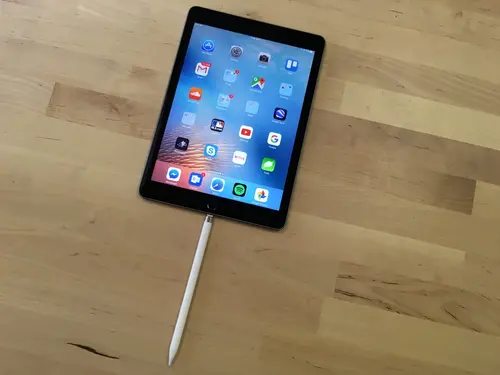
Above: The odd lollipop shape you get when you’re charging the Apple Pencil in the iPad Pro.
Image Credit: Jordan Novet/VentureBeat
And when you’re charging the Pencil, that means you can’t use iPad’s Lightning port for anything else, like a wired keyboard or the AC adapter. It would be nice to have a dedicated port for charging the Pencil at a better angle.
The Pencil still doesn’t have any kind of holster to put it in. I’m constantly worried I’ll lose it.
Oh, and there’s still no eraser.
But with all that said, the Apple Pencil lets you do more with this iPad than you can with non-Pro iPads. If you’re going to the 9.7-inch Pro, you probably should pick up the Pencil, too.
Split View
Just like the original iPad Pro, the new one supports the Split View feature, which lets you use two apps simultaneously, in portrait or landscape mode. I’ve found this to be useful — less jumping between programs.
The related Slide Over feature makes things simple if you’re really focusing in one app and you just want to do one quick thing in another one. You just swipe left from the right edge of the screen, select the app you want, do your thing, and then tap the rest of the screen to get back to what you were doing.
Unfortunately, some apps still don’t support Split View and can’t fully work with Slide Over. Gmail, for example. Google added iPad Pro support for Docs and Sheets last month, but Split View still isn’t there.
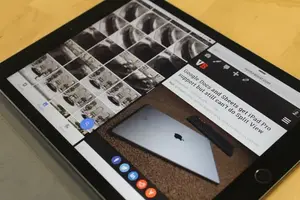
Above: The iPad Pro in Split View.
Image Credit: Jordan Novet/VentureBeat
And more generally, some apps like Google Calendar, Instagram, Postmates, and Snapchat, won’t even take up the entire display of the iPad Pro — just like on the first model.
In the future, it would be nice to see Apple let you run Slide Over while you’re in Split View mode.
Size
If there’s any size that’s just right for the iPad, this is it. The gadget weighs less than a pound without the Smart Keyboard. In practical terms, it’s not too heavy for you to hold with one hand in pretty much any position you want. I can’t say that about the original iPad Pro. But this new one has just as solid of a build quality as the first.
Display
Video, images, and text all show up very clearly on the Retina display. The True Tone feature, which adjusts colors on the display based on ambient light conditions, is a helpful addition that hasn’t made it to any other iOS device. It’s turned on by default, so you won’t notice how much of a difference it makes on your eyes until you turn it off.
Night Shift, a feature of iOS 9.3 that lowers color temperature during evening hours to make it easier to fall asleep, looks gorgeous on this tablet. I have it set to come on before the sun sets and turn off after the sun rises — I like it that much.
Performance
Apps switch very quickly, with a minimal amount of lag and browser tabs getting dropped. Picture in picture works very well — watching, say, a baseball game in MLB.TV doesn’t noticeably slow down Web browsing.
The smaller iPad Pro carries the same A9X chip and M9 coprocessor as the original iPad Pro, but it’s reported to have 2 GB of RAM, which is half of what the original iPad Pro comes with. For a Pro iPad with a Pro price, it ought to come with more onboard. Sure, performance in many apps is snappy now, but in one or two years, it might not be.
Battery life
As is the case with all iPads, Apple promises “up to 10 hours of surfing the web on Wi‑Fi, watching video, or listening to music.” But I’ve found the battery lasting 15 hours or more, which is a pleasant surprise.
Getting the battery back to 100 percent takes about three and a half hours. Recharging takes longer if you’re using the device at the same time — you’ll pick up only a few percentage points per hour.
I wish there were a way for me to simultaneously charge the iPad and use a full-size keyboard that I connect to the tablet with the Lightning port. If I want to charge the iPad, charge the Apple Pencil, and use the wired keyboard, then I’m again out of luck.
Cameras
A scan of the iPad comparison page on Apple’s website reveals that this iPad Pro actually beats out its larger sibling, as well as any other iPad for that matter, when it comes to photo and video features. For instance, there’s 4K video support, True Tone Flash, Focus Pixels, and continuous autofocus video recording.
But for someone who doesn’t use his tablet as his main camera, I’m not hugely excited about most of this stuff. It’s nice to have. The exception here is Live Photos. When you’re using the front-facing five-megapixel FaceTime HD camera and you make a Live Photo, you capture a lot of detail, and when you play it back on the 9.7-inch display, there’s a lot to see — and hear. Like never before on an iPad, every photo is a Live Photo.

Above: Our editor in chief, Blaise Zerega, tries out the 9.7-inch iPad Pro’s FaceTime HD Camera.
Image Credit: Jordan Novet/VentureBeat
The upside of that is you can go back in your Camera Roll and appreciate all the visual detail the camera picked up when you were just trying to take a simple snapshot. Of course, if you have an iPhone 6s or 6s Plus, then you’ve probably gotten used to this by now.
This iPad comes with the new Retina Flash feature (also on the 6s and 6s Plus), so you’ll get brighter selfies than ever with an iPad.
And the 12-megapixel back camera (again, already on the 6s and 6s Plus) is the best yet on an iPad, although there’s still a good bit of noise when you zoom.




Aesthetic perfectionists, take note: This tablet has a camera bump.
Speakers
The four speakers are plenty loud and clear — roughly as good as the ones on the larger iPad Pro. They’re so loud that it can be hard to get the attention of always-on Hey Siri.
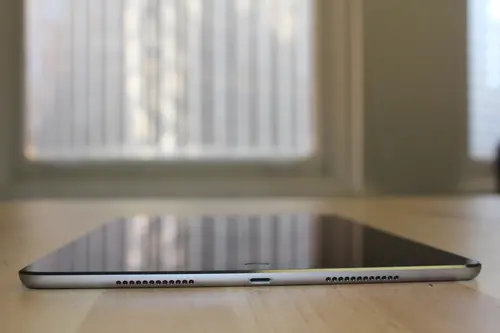
Above: The speakers on the bottom of the 9.7-inch iPad Pro.
Image Credit: Jordan Novet/VentureBeat
But because the tablet now has speakers located on two sides, not just one, this one will not perfectly fit into cases designed for older 9.7-inch iPad.
Graphically intensive workloads do heat up the iPad, although it hasn’t ever become uncomfortably hot.
It’s nice to have the tablet come standard with 32GB of storage, as the original Pro did. Could you use more? Of course. But this is nonetheless a cut above other iPad since Apple introduced the product in 2010.
The sequel beats the original
In hindsight, I think my hunch about how the original iPad Pro needed improvement was right on — sure enough, it has gotten better in this new model. This one is more to my liking.
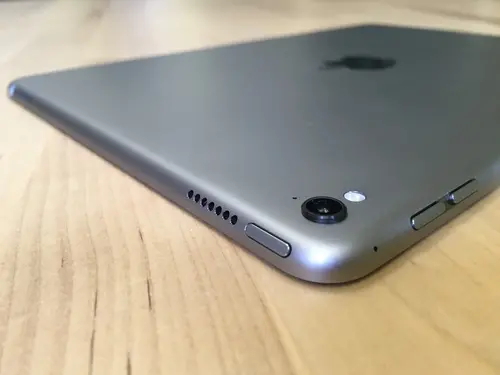
Above: The camera bump on the 9.7-inch iPad Pro.
Image Credit: Jordan Novet/VentureBeat
The whole package, without cellular connectivity or extra storage, will set you back at least $847 — $220 less than the initial iPad Pro, but $448 more than a standard-issue 9.7-inch iPad Air 2.
Would it be nice if the iPad shipped with the Pencil and the Smart Keyboard, and with a lower price tag? Sure. But this is certainly an upgrade from classic iPads. You’ll just have to pay extra.
.